


Product details
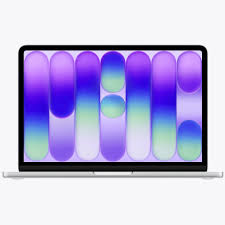
Microsoft Surface Laptop 7 15″ Snap X Elite 16GB/512GB Price in Kenya
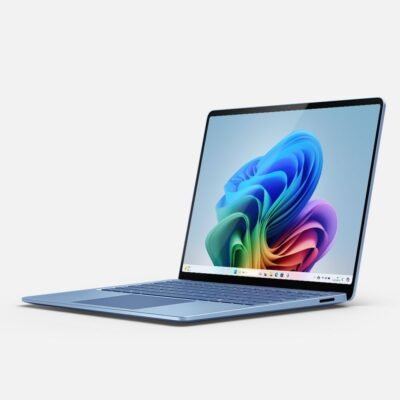
The Microsoft Surface Laptop 7 stands out in the contemporary market of portable computing devices, reflecting a well-balanced combination of power and elegance. Launched as part of Microsoft’s innovative Surface line, this laptop is designed to cater to both professionals and personal users. Aesthetically, it showcases a sleek, minimalist design that is both modern and sophisticated, making it suitable for various environments, from board rooms to coffee shops.
Constructed with high-quality materials, the Surface Laptop 7 exhibits impressive build quality, which not only contributes to its aesthetic appeal but also ensures durability. Its aluminum chassis feels robust, offering resilience against everyday wear and tear. The laptop features a stunning PixelSense display, which provides vibrant colors and sharp visuals, enhancing the overall user experience, whether one is working on spreadsheets or enjoying multimedia content.
Targeting a wide spectrum of users, the Microsoft Surface Laptop 7 is particularly favorable for students, professionals, and anyone who demands versatility from their device. With configurations designed to handle various tasks, including demanding applications, it serves well in both creative and corporate sectors. The integration of Intel’s Core i7 processor along with 16GB of RAM indicates Microsoft’s commitment to performance, particularly beneficial for users who multitask or work with resource-intensive software.
This laptop not only emphasizes performance but also portability. Weighing under three and a half pounds, the Surface Laptop 7 is lightweight, allowing users to carry it effortlessly. Furthermore, its long battery life guarantees support throughout the day, making it an ideal companion for those who are always on the go. In essence, this device delivers an exceptional blend of power, portability, and design, positioning itself effectively in the highly competitive laptop market.
Key Specifications and Features
The Microsoft Surface Laptop 7 15″ emerges as a formidable contender in the ultrabook category, boasting impressive specifications that cater to both productivity enthusiasts and casual users alike. At its core, this model is powered by Intel’s 10th generation Core i7 processor, which ensures a smooth and swift performance, particularly for demanding tasks such as video editing or 3D rendering. Coupled with 16GB of RAM, multitasking becomes seamless, allowing users to toggle between applications without a hitch.
Storage is another vital aspect where the Surface Laptop 7 excels, featuring a 512GB SSD. This not only provides ample space for documents, images, and applications but also enhances system responsiveness with rapid data access speeds. Users will appreciate the efficiency that this solid-state drive brings, contributing to an overall improved workflow.
The display technology is yet another highlight of the Surface Laptop 7. It comes equipped with a 15″ PixelSense touchscreen, offering a resolution of 2496 x 1664 pixels. The vivid colors and sharp clarity make it ideal for both creative tasks and media consumption, ensuring a more engaging and immersive experience. Additionally, the aspect ratio of 3:2 lends itself well to productivity-focused activities, optimizing users’ ability to view more content vertically.
As far as battery life is concerned, this laptop promises up to 11.5 hours on a single charge, a substantial duration that suits both on-the-go productivity and leisure use. When compared to its predecessors, such as the Surface Laptop 6, the 7th generation has made notable advancements in thermal management and power efficiency. Furthermore, when positioned against competitors like the Dell XPS 15 or MacBook Pro, the Surface Laptop 7 holds its ground with a compelling combination of power, portability, and premium features.
Display and Design: A Visual Experience
The Microsoft Surface Laptop 7 15″ boasts an impressive display, featuring a resolution of 2496 x 1664 pixels. This high-resolution screen delivers vivid visuals, ensuring clarity whether one is viewing high-definition videos, editing photos, or simply browsing the web. The PixelSense technology employed in the display enhances color accuracy and allows for an immersive viewing experience, suitable for creative professionals who require precise color representation.
Color reproduction is noteworthy, offering a wide spectrum that makes images bright and true-to-life. The Surface Laptop 7 excels in outdoor visibility, with its anti-reflective coating helping to mitigate glare. Users can comfortably work in various lighting conditions without straining their eyes. This feature, combined with a maximum brightness of 400 nits, means users can expect consistent performance whether indoors or outside.
Aside from the display, the overall design of the Surface Laptop 7 is both stylish and pragmatic. It features a sleek, minimalist aesthetic that is enhanced by its premium aluminum casing. This design not only contributes to the laptop’s lightweight nature—starting at just 4 pounds—but also ensures durability, making it ideal for on-the-go professionals. The keyboard is designed with ergonomics in mind, sporting well-spaced keys that offer satisfying travel and responsiveness, which can make long typing sessions much more pleasant. Moreover, the large trackpad provides smooth navigation, supporting Windows Precision drivers, and allows for multi-finger gestures that improve user experience.
In terms of portability, the Surface Laptop 7’s thin profile of around 0.57 inches makes it easy to slip into a bag without adding much bulk. This combination of a high-quality display and a refined design creates a compelling option for both casual users and professionals seeking powerful performance in a portable format.
Performance Review: Power in Action
The Microsoft Surface Laptop 7 15″ equipped with Intel’s Core i7 processor, 16GB of RAM, and 512GB of storage is designed to deliver exceptional performance across a variety of tasks. In everyday usage scenarios, such as web browsing, office applications, and streaming, users can expect a smooth experience, largely due to the powerful hardware specifications. The multitasking capabilities are commendable, allowing multiple applications to run simultaneously without noticeable lag, making it a good choice for professionals and students alike.
When it comes to gaming, the Surface Laptop 7 holds its ground reasonably well. Although it is not primarily marketed as a gaming machine, it can handle titles that are not excessively demanding on graphic resources. Users have reported satisfactory frame rates on medium settings in popular games, thus providing a decent gaming experience for casual gamers who may wish to unwind after a long day.
For those involved in creative work, such as video editing or graphic design, the Surface Laptop 7 proves its worth. The abundant RAM and high-performing Intel Core i7 make it easy to work with large files and run software such as Adobe Creative Suite efficiently. Benchmark tests indicate that the laptop performs admirably in rendering tasks, allowing for a more fluid workflow. Feedback from users engaged in creative endeavors highlights its ability to handle intensive tasks without overheating or throttling, which is a crucial factor in maintaining productivity during long sessions.
In summary, the performance profile of the Microsoft Surface Laptop 7 15″ showcases its versatility, making it suitable for both everyday tasks and more demanding applications. With adequate power and responsive performance, it stands out as a reliable device for diverse user needs.
Software and User Experience
The Microsoft Surface Laptop 7 15″ operates on the Windows 10 operating system, which provides a sophisticated and user-friendly interface designed for both casual users and professionals alike. With Windows 10, users benefit from a seamless integration of apps and services that contribute to an enhanced productivity experience. Windows 10 is known for its versatility, supporting a wide range of software, from productivity suites to high-performance applications needed by professionals.
Pre-installed applications, such as Microsoft Office and various accessibility tools, allow users to begin their work without the need for additional installations. The inclusion of essential applications ensures that users can engage in tasks ranging from document creation to advanced data analysis right out of the box. Additionally, the Surface Laptop 7 offers powerful multitasking capabilities, allowing users to switch between apps smoothly and efficiently.
One notable feature of the Surface Laptop 7 is its compatibility with Windows Ink and the Surface Pen. These functionalities allow for more dynamic interactions with the device. Users can take handwritten notes, sketch concepts, or annotate documents directly on the screen, which can significantly enhance creativity and collaboration. The Fluid and responsive touchscreen further strengthens this experience, providing an intuitive user interface.
Furthermore, the Windows Hello feature allows for quick and secure log-in options, using facial recognition technology. This improves user experience by saving time while maintaining high security levels. Overall, the combination of Windows 10 with the unique features of the Surface Laptop 7 creates a harmonious user experience, allowing for optimal productivity and engagement across various tasks.
Battery Life and Connectivity Options
The Microsoft Surface Laptop 7 15″ is noteworthy for its battery life, claiming up to 11.5 hours on a full charge. This performance can significantly vary based on usage patterns. For instance, during basic tasks such as web browsing and document editing, users may expect to approach the upper limit of the stated battery life. However, engaging in intensive applications like graphic design or video editing can reduce battery longevity considerably. Users have reported varying runtimes, often ranging from 6 to 10 hours based on workload, settings, and display brightness.
In terms of connectivity, the Surface Laptop 7 comes equipped with various ports to accommodate a range of peripherals. It features two USB-C ports, which support Thunderbolt 3, enabling fast data transfer rates and versatile connectivity options, particularly with external monitors and storage devices. Additionally, there is a traditional USB-A port, a headphone jack, and a Surface Connect port for charging and docking, thus providing ample choices for users looking to expand their workflow capabilities.
Furthermore, the device supports both Bluetooth 5.0 and Wi-Fi 6 technology, ensuring robust wireless connectivity. Wi-Fi 6, in particular, offers improved speeds and efficiency in crowded environments, making it ideal for users in office spaces or public settings. The Surface Laptop 7 is also compatible with Microsoft’s modern standby feature, allowing it to maintain connections to networks even while in sleep mode, thus enhancing its versatility.
Overall, the Microsoft Surface Laptop 7 15″ demonstrates a commendable balance of battery efficiency and connectivity options, catering to diverse user needs while maintaining a portable design.
Pros and Cons of the Surface Laptop 7
The Microsoft Surface Laptop 7 has gained considerable attention in the market, and its advantages are frequently highlighted by users and reviewers alike. One of the primary pros is its sleek design and high-quality build. The premium materials used in its construction give it an elegant appearance, making it an attractive option for professionals who value aesthetics. Additionally, its lightweight nature enhances the portability aspect, allowing users to easily carry it around without much effort.
Performance is another strong point of the Surface Laptop 7, particularly with its Intel Core i7 processor. Coupled with 16GB of RAM, this laptop can handle demanding tasks such as video editing and multi-tasking efficiently. The 512GB SSD provides ample storage and contributes to faster boot times and quick access to applications, which is crucial for productivity.
However, despite its commendable features, there are some disadvantages worth considering. The pricing of the Surface Laptop 7 tends to be on the higher side compared to competitors in the same category, which might deter budget-conscious consumers. Furthermore, while it excels in processing power and design, it lacks certain connectivity options, such as USB Type-C ports, which have become standard in many newer devices.
Another point of concern is the battery life. While it is adequate for daily use, some users report that it does not match the longevity offered by certain competitors. This could be an essential factor for individuals who rely heavily on their devices throughout the day. Overall, the Surface Laptop 7 is a compelling choice, yet potential buyers should weigh these pros and cons carefully to determine if it aligns with their specific needs and preferences.
Comparative Analysis with Other Laptops
The Microsoft Surface Laptop 7 15″ equipped with Intel’s Core i7, 16GB RAM, and 512GB storage positions itself as a robust contender in the premium laptop market. Its performance capabilities allow it to compete effectively with a range of alternatives, including the Dell XPS 15, Apple MacBook Pro 16, and HP Spectre x360.
When evaluating performance, the Surface Laptop 7 showcases impressive computing power, thanks to its quad-core i7 processor. The Dell XPS 15 offers similar specifications, with a slightly superior graphics card option which appeals to gamers and professionals engaging in graphic-intensive tasks. In terms of raw performance, both models can be compared closely; however, the Surface Laptop tends to excel in its integrated graphics performance while maintaining a sleek and lightweight build.
Pricing is another critical aspect in this comparative analysis. The Surface Laptop 7 starts at a competitive price point, making it an appealing option for users seeking high-end performance without excessively high expenditures. The MacBook Pro 16 varies considerably in cost depending on configurations, often pushing it into a higher price bracket that may not be justifiable for all users. On the other hand, the HP Spectre x360 offers a more versatile two-in-one interface at a price that caters to budget-conscious consumers.
Unique selling points also play a vital role in distinguishing these devices. The Surface Laptop 7 is lauded for its touchscreen display, quality build, and seamless integration with Windows 10, enhancing productivity for those who value functionality over flashy extras. By contrast, the MacBook Pro is renowned for its operating system optimization and exceptional battery life. Ultimately, while each of these laptops brings substantial merits to the table, the choice will largely depend on user preference and specific needs.
Conclusion: Is the Microsoft Surface Laptop 7 Worth It?
After thoroughly examining the Microsoft Surface Laptop 7, it becomes clear that this device stands out for its impressive combination of hardware specifications and design features. With the Intel Core i7 processor, users can expect a high-performance laptop that is capable of handling demanding tasks like video editing, programming, and multitasking efficiently. The inclusion of 16GB of RAM ensures smooth performance, allowing for seamless operation even with multiple applications running concurrently.
Another significant feature of the Surface Laptop 7 is its 512GB storage capacity. This ample space provides enough room for the storage of large files, applications, and additional resources that professionals may require daily. Coupled with the sleek design and lightweight portability, the laptop appeals to those who need a powerful device that can easily be carried around, whether for work, school, or leisure activities.
However, potential buyers should consider their specific needs when deciding if the Microsoft Surface Laptop 7 is a suitable choice. While it excels in performance and aesthetics, some users may find that it lacks certain gaming capabilities compared to other laptops on the market designed specifically for gaming. Additionally, the premium price point may deter budget-conscious consumers, prompting them to consider other alternatives. Ultimately, the decision should weigh the importance of performance, portability, and design against their individual usage requirements to assess whether investing in the Surface Laptop 7 aligns with their technological demands.

There are no reviews yet.